Stay, Fork, or Build: a field guide to the Medplum Provider App

.webp)
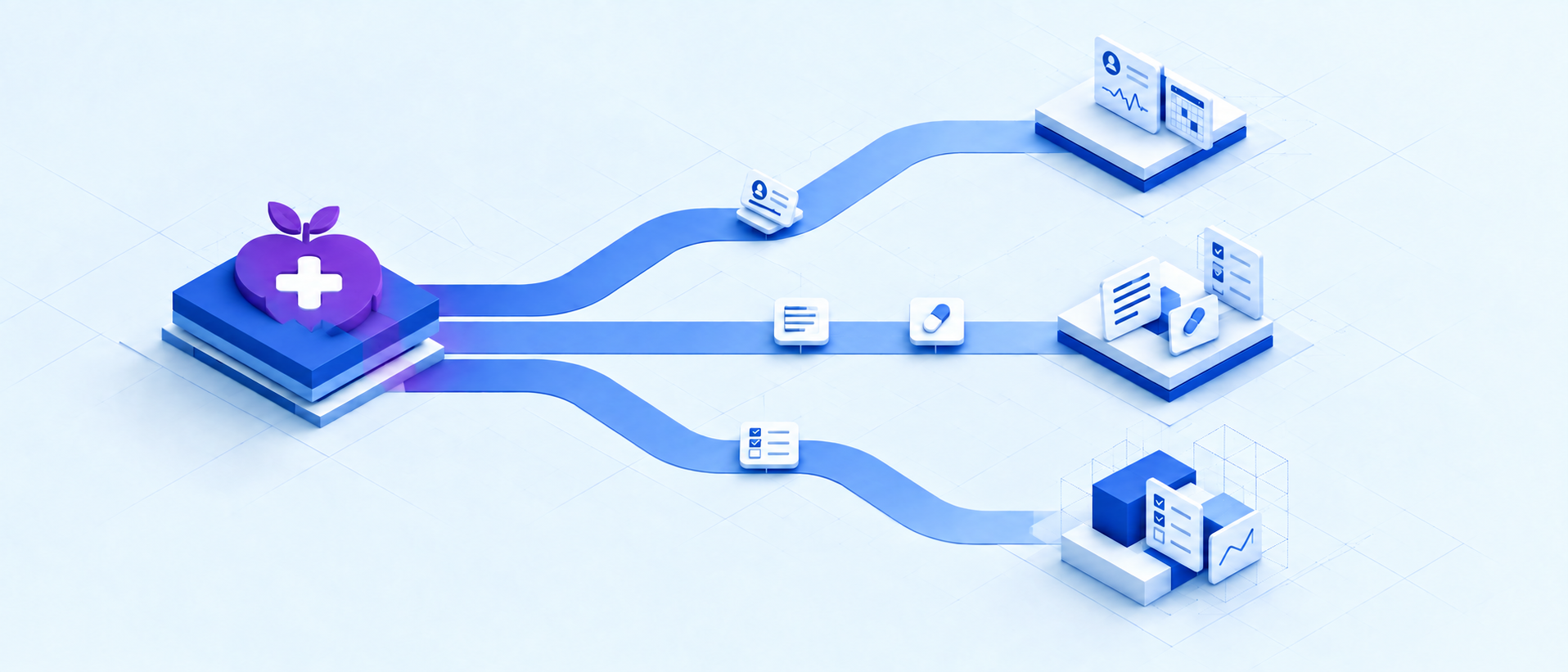
Building compliant, clinician-ready software is one of the hardest problems in healthcare, and it's the reason so many teams turn to Medplum instead of starting from scratch. But adopting Medplum raises a question almost every team eventually has to answer: how much of its Provider App, the platform's reference clinical UI, should you keep as is, and how much should you customize?
This September, I gave a talk at PlumCon in San Francisco, alongside the Medplum Provider App team, on this question, and this article expands on that talk. We've shipped nine Medplum engagements since Vinta became a Medplum implementation partner in early 2024: five provider-side EHR products and four task-management or CRM-leaning care programs, and this is what they taught us about choosing between three routes: stay on the stock app, fork it, or build a separate one, plus a fourth axis that cuts across all three: integrate.
TL;DR: Stay when the built-in workflow already fits, and your MVP builds elsewhere (patient-side, ops, etc.). Fork when the Provider App covers most of the product and you are adding incremental screens or workflow changes. Build a new provider application when you would replace most of the UI, need native mobile, or need seamless CRM or Ops features. Backend integration work (billing, telephony, migrations, notifications, etc.) is a separate decision that applies no matter which frontend route you take.
What is Medplum's Provider App?
Medplum is an open-source, FHIR-native EHR platform, and the Medplum Provider App is the reference frontend Medplum built on top of it: a clinical workspace with patient charting, tasks, scheduling, messaging, etc., all wired to Medplum's FHIR backend.
Medplum consolidated many of its separate product demos into this one app so implementation partners and customers would have a working starting point instead of a blank canvas.
It's worth being just as clear about what it isn't: the Medplum Provider App is built for clinicians and staff, not a patient portal, nor a full operations platform. If your product needs a patient-facing surface or deals with complex care ops, that might require a separate app on the same Medplum backend; more on that below.
It has grown a lot since its first version, which was a thin layer over the platform: just a sidebar with Patients, Schedule, and New Patient, with lab results opening in the generic resource editor as raw FHIR fields.
As of a recent build, the same app is a full clinical workspace: the sidebar adds Spaces, Messages, Tasks, and Faxes; the chart adds Visits, Meds, Orders, Devices, Documents, Care Plans, and DoseSpot tabs; and a completed lab order renders as an actual LabCorp report instead of a table of resource fields.
The Provider App's source lives in the Medplum monorepo, with builds shipping roughly every week, so the honest first step in any Stay-Fork-Build decision is checking the current app, not assuming last year's gap list still holds.
What are your three Medplum Provider App options: stay, fork, or build?
We frame every Medplum frontend decision around three options, plus one that runs orthogonal to all of them:
- Stay - Use the stock Provider App with configuration and bots. Choose this when the built-in workflow already fits.
- Fork - Keep most of the app and add or change some screens and workflows.
- Build - Create a new app with the Medplum SDK, reusing @medplum/react where the platform and design system permit. Choose this when the UX, platform, or audience differs substantially from the Provider App.
- Integrate (orthogonal) - Backend or integration work such as bots, subscriptions, and data pipelines. This work does not determine the frontend choice, and it applies whether you stay, fork, or build.
None of these routes lock you in. You can launch with the stock app, learn which workflows need custom UI, and fork or build later.
A fork can also replace stock screens over time until it looks more like a custom build. And building a custom app does not mean leaving Medplum: you may keep the hosted FHIR backend and services, can self-host the frontend, or replace other parts of the stack down the line.
Most of Medplum, including its SDKs, components, data model, and reference apps, is open source, so Stay, Fork, and Build really describe how much of the Provider App you use today, not a permanent architectural commitment.
Is Medplum's Provider App your product, or a companion to it?
Before applying the three routes to your own project, decide how central the provider-facing app is to your business:
- Companion app - The app supports your product but isn't what you sell. Minimize custom work and prefer configuration to code.
- Profit center - The provider app is a major part of what you sell. Its UI and workflows need to support your competitive advantage.
This distinction changes what "done" looks like. If the app is your product, removing generic screens can matter more than adding features, and design and usability can matter more than feature count.
Across our nine engagements, the most common reason teams forked was needing a custom UI on top of an app that otherwise fit well. The distinction also affects your budget: if the provider app is a profit center, the ongoing cost of merging upstream changes is usually worth it; if it's a companion app, it often isn't.
.webp)
When should you stay on Medplum's stock Provider App?
Across our nine Medplum engagements, the mix looked roughly like this:
- two projects predated the Provider App and had no choice but to go custom
- one stayed on the stock app
- two forked it
- three built separate apps
- one needed no new frontend at all, using Medplum purely as a backend.
Here's how we'd draw that line for your project.
Check the current app before treating a feature as missing. Its source lives in the Medplum monorepo, with roughly weekly builds. As of a recent commit, it already ships:
- Scheduling with weekly and service-specific availability
- Tasks and Chat with subscription-backed notification badges
- Patient charting with Questionnaire-based intake, including voice-assisted AI intake
- AI Spaces with patient-context prompts and tool-enabled FHIR operations
- Documents and a patient timeline
- Labs, medications, and eRx
- Fax, insurance, and eligibility
- Encounters with sign-and-lock and Provenance-based addendums
- Charge items through Candid or Stedi claim submission
- SMART Health Link import
- Care plans through PlanDefinition
The question that matters is whether the built-in workflow fits, not only whether a feature exists somewhere in the app. Stay when:
- You need a fast MVP. If you want to test a clinical model within one to three months and the default UI is sufficient, avoid the maintenance cost of a fork until you have evidence you need one.
- The workflows are standard. Registration, scheduling, and visit documentation that match Medplum's reference workflows are good Stay candidates.
- Bots, subscriptions, or Questionnaires are enough. These can handle automation, routing, and intake forms without changing the Provider App, and they can also support custom apps outside it.
On one of our engagements, configuration and bots covered every standard workflow the practice needed, task management included. The same team then built a separate patient portal for a staged intake journey, screening questionnaires, and self-pay checkout, all on the same Medplum backend.
That combination, stock Provider App plus a purpose-built companion app, is often the fastest path when the provider-facing workflow is already standard.
A few other requests tend to land on Stay by default: eRx, labs, and fax are vendor-dependent (DoseSpot or ScriptSure for eRx, Health Gorilla for labs), so they work out of the box as long as your vendor is supported.
Insurance eligibility checks work the same way, calling $submit against a standard CoverageEligibilityRequest. And most outbound notifications and workflow automation can run on bots and subscriptions without touching the frontend at all.
If the Provider App already covers what the provider needs, you can build only the other flows around it. Intake, patient portal, operations, and AI-agent surfaces can all use the same Medplum backend without turning the provider app itself into a fork.
When does it make sense to fork Medplum's Provider App?
Fork when the Provider App covers most of the product and you need additional screens or workflow changes on top of it.
Origin Therapy, one of our clients running a pediatric therapy platform, is a clean example: the sidebar still reads Home, Patients, Schedule, Templates, and Profile, and the patient header, demographics, and tab bar are all stock.
The fork added new screens (Payments, Patient Waitlist, Support) and new features on existing ones, including a Forms tab that tracks intake status per template (pediatric speech, occupational, and physical therapy), with a "Request form completion" button that triggers a bot to email the family and route them into a separate intake app.
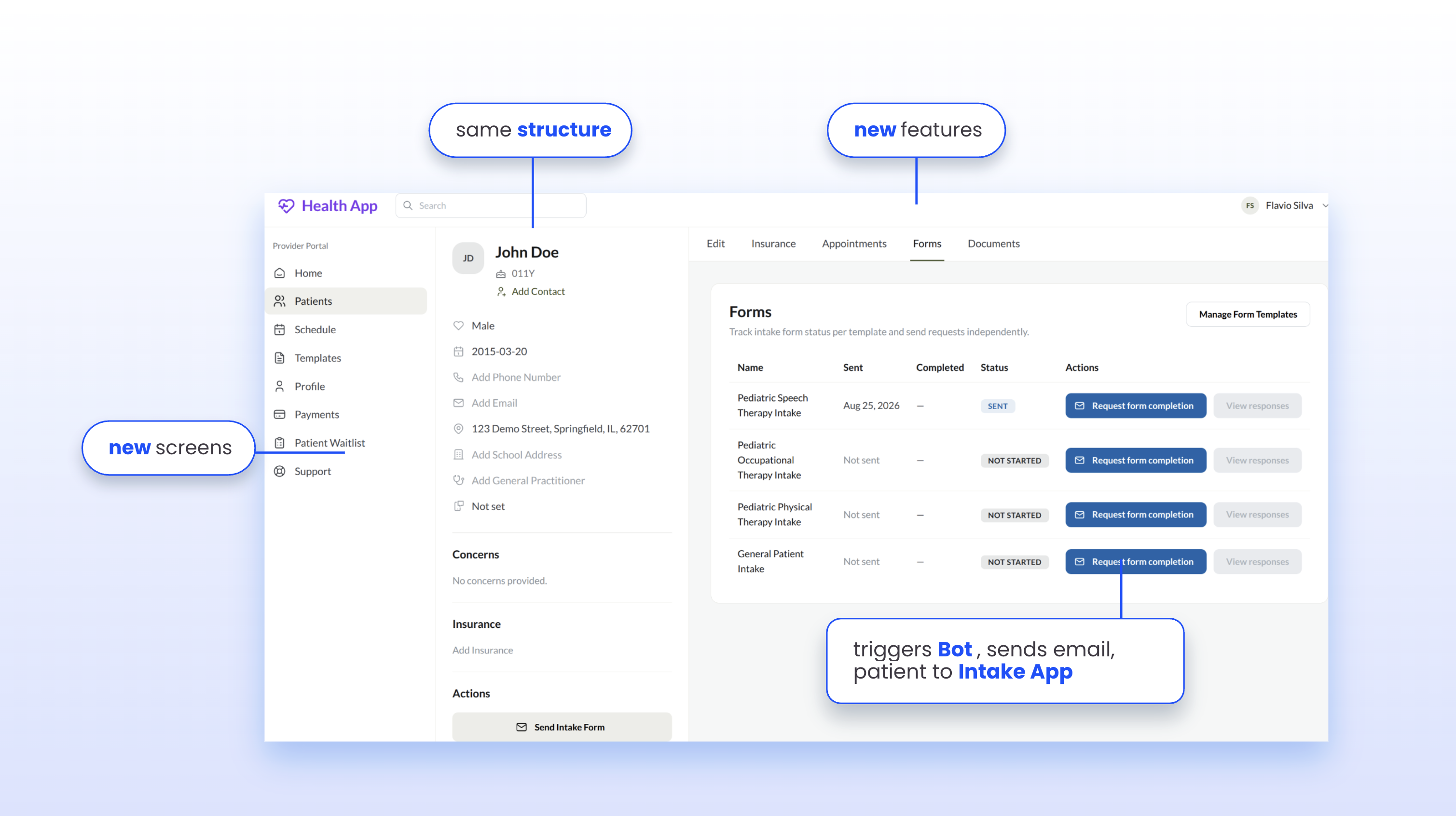
That last detail is a good example of why classifying by route matters even within one feature: the Forms tab is a Fork, the separate intake app is a companion-app Build, and the bot plus email are a Integrate work.
Recurring fork requests across our projects include:
- Provider matching
- Patient waitlists and caseload views
- Telehealth inside the encounter workflow
- Embedded AI beyond stock Spaces and voice-assisted intake, such as a specialty-aware scribe, billing assistant, or workflow copilot
- Specialty charting beyond Questionnaire-based forms
- Vitals and flowsheets
- Episodes of care
- Custom care plans
- Referral intake and caseload management
- RCM worklists
- Multi-language patient messaging, since neither the Provider App nor @medplum/react ship with i18n support
- Custom reporting and dashboards beyond what's available over the FHIR API
- New fields anywhere, such as in tasks and scheduling
A good fork starts close to upstream. Stock navigation and UX mostly survive, and the team adds, removes, and improves screens without changing the app's interaction model. Divergence may grow later, but the first features stay coherent with the existing UI and UX, the way Origin's did.
When forking, teams usually end up adding a similar set of things: intake and patient-portal handoffs, richer charting for specialty templates and workflows, and chat or telephony beyond stock messaging (softphone integration, care-team routing, call logs, etc.).
Two forking situations are worth naming because they are easy to misjudge:
- Task management looks done in the stock app: it already supports priority, due dates, and basic status filtering. But once a care program needs recurring outreach, escalation, subtask hierarchies, or bulk operations, it has effectively become a CRM or operations surface, and that points to Build rather than Fork;
- Telephony is really two decisions bundled together: Twilio webhooks and call-status mapping to FHIR Communication are Integrate work, while the softphone UI, routing rules, and provider presence follow the frontend route (Fork in a mostly-fitting app, Build in a custom product). Classify the two parts separately before estimating them.
Forking also comes with a cost worth pricing upfront: the Provider App is an actively developed reference implementation, not a versioned product with migration guides, so upstream changes must be merged manually. The stack requires familiarity with React, Mantine, and @medplum/react.
When should you build a custom app instead of Medplum's Provider App?
Build a new app when you would replace most of the Provider App's UI and interactions.
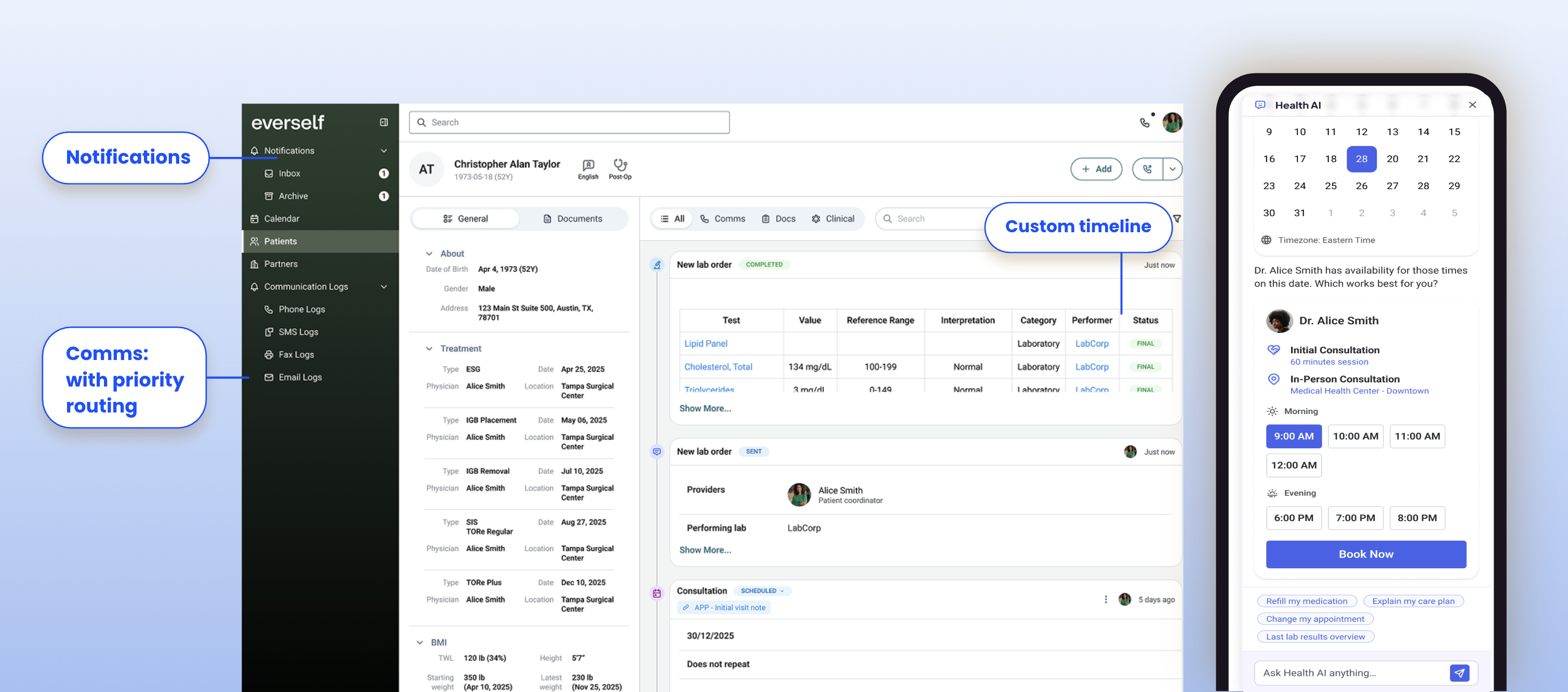
Everself, one of our clients running an obesity-care program, is a good example: its daily workflow is care operations, not clinical charting. A notifications inbox with an archive, communication logs split across phone, SMS, fax, and email, live telehealth, and a patient timeline that mixes messages, documents, and clinical events like lab orders in one feed, all running on a phone-sized screen too.
Almost none of the Provider App's chart-centric UI would have survived a fork, so we built with the SDK instead, with a strong Care Ops and CRM focus.
Common Build signals from our engagements:
- A complete UI overhaul, where a fork would keep little of the original value
- Legacy UX informing decisions, meaning the familiarity of the care team with a legacy EHR demands a build that’s different from what the Provider App offers
- Native mobile. The Provider App is a React web app; React Native can still talk to FHIR directly
- A dedicated patient portal
- A non-standard care model, such as a dyad chart or a complex organization structure that needs permission rules affecting the entire UI
- Task management that becomes a CRM. Once a care program needs recurring outreach, escalation, subtasks, or bulk actions, it has outgrown what the stock Tasks tab supports
Another way to run the same test: ask whether the Provider App's underlying assumptions still hold for your product.
What Medplum work runs independent of the frontend decision?
Plan this work separately, because it applies no matter which frontend route you choose:
- Outbound notifications — bots and subscriptions
- Workflow automation — routing, escalation, and follow-up sequences
- Migration and legacy data — ETL to FHIR and identity resolution
- Billing and RCM integrations — clearinghouse and payer connections through hosted operations and bots; only staff worklists are frontend work
- Telephony and SMS — webhooks, delivery-status mapping to Communication, consent, and opt-out handling
- HIE and record exchange — retrieval, reconciliation, and inbound referrals through services such as Metriport or Health Gorilla
- Analytics and conversion tracking — check whether the vendor has a BAA and whether event payloads can carry PHI before wiring anything up
FHIR Task can support care journeys, but it is not a full patient relationship management system on its own. Dedicated CRM products have stronger funnel views, outreach sequences, and engagement tracking.
On Everself, our answer was to integrate the CRM and own the clinical-state derivation: commercial tools handled the marketing funnel while the app derived procedure stage and payment state at runtime from appointment and checkout data, avoiding duplicated clinical state across systems.
Sometimes no new frontend is necessary at all. Medplum can sit as the system of record behind another surface entirely, the way Awell orchestrates care workflows on top of Medplum, or expose backend-only surfaces through an on-prem agent, CDS Hooks, an AI MCP server, or the FHIR API directly.
What mistakes to avoid when customizing Medplum, regardless of your route
A few anti-patterns showed up often enough across our engagements to call out on their own:
- Do not add a custom API between the app and Medplum without a clear need. Keep FHIR available directly in the frontend, including in React Native apps. A middle tier prevents direct use of Medplum's frontend components and moves authorization away from Medplum's per-user resource boundary, so you end up reimplementing that authorization yourself.
- Do not treat server-side rendering casually. @medplum/react is not built for React Server Components or SSR out of the box, and a shared server-side MedplumClient puts every user in one rate-limit pool. Make sure each request still resolves to the real user's AccessPolicy and rate-limit boundary, and treat SSR adaptation as deliberate architecture work rather than a routine framework migration.
- Do not add another database by default. FHIR can hold the clinical record and most operational state. Analytics is the main exception; introduce another store only for a defined need.
- Do not drop Mantine or @medplum/react casually. Choose a replacement design system, such as Tailwind and shadcn with defined tokens, before rebuilding the first screen. Before removing @medplum/react, review what it already provides, resource rendering, search controls, and authentication, and replace it one component at a time.
- Do not store workflow state in fields the server cannot search. Some projects stored status in a custom patient extension or free-text fields, then had to fetch entire collections and filter in the browser as lists grew. A custom code system, a custom identifier, or a tag are all searchable; use one of those instead, since changing this later requires a live-data backfill.
What to do, regardless of your route
- Prefer Medplum's hosted environment, including for local development, unless self-hosting solves a concrete requirement.
- Model your data in US Core and standard terminologies, using components like CodeableConceptInput, so coded data stays searchable and interoperable. Don't overthink what doesn't fit the standard model: a custom code system or custom identifier is still searchable, and a tag works when there's no better field.
- Monitor bots with Sentry and logs. Bots can fail silently; make integration failures visible to the team responsible for them.
- Define a unit-test boilerplate based on Medplum's own patterns, and reuse it across bots and app features.
- Use a task queue for complex scheduled work. Cron jobs are fine for simple periodic sweeps, but reminder sequences, re-consent, care-plan reviews, and inactivity checks need per-recipient state, retries, and visibility into what will run and for whom.
- Expect vendor friction. Prefer integrations your team has already proven where possible.
How we ship Medplum projects faster
Nine Medplum engagements is a lot of repetition, and we've turned that repetition into a shelf of proven components, so your project doesn't start from a blank canvas. This is one of the real advantages of working with a partner that has shipped this many Medplum products: less time spent reinventing plumbing, more time spent on what makes your product different.
Some of what we bring to every engagement:
- A healthcare building-blocks monorepo — three deployable apps (intake, patient portal, and provider workflows), with features already battle-tested across nine client projects
- An open-source Medplum design system — Figma token handoff and Tailwind/shadcn components, so design and engineering ship from the same source of truth
- Vinta Schedule — a standalone scheduling engine with a GraphQL API and typed React hooks, built for pooled availability across providers, rooms, and equipment
- A notification framework — adapters for SendGrid and Twilio SMS/voice, already wired to FHIR-native Communication resources (see our VintaSend integration guide)
- Kill the Clipboard — an open-source SMART Health Cards and Links library for verifiable, patient-shareable records
- The Medplum AI Concierge — an open-source demo of a provider dashboard that generates charts and answers questions about the record using Generative UI
- A library of AI agent skills — a .agents/skills folder with reusable, named workflows (add-intake-step, add-notification, fetch-valueset, fhir-data-model, medplum-sdk, schedule-codegen, and more) that help coding agents use Medplum's FHIR data model and SDK correctly instead of guessing
Much of this is open source at Vinta’s GitHub. If you're weighing Stay, Fork, or Build for your own product right now, these are the same building blocks we'd bring to your project.
None of this replaces a team, though, and that holds well past launch. AI can speed up how fast you implement Stay, Fork, or Build, but a fork or a custom build is a long-term commitment: someone has to merge upstream changes, own incidents, and keep learning what your users actually need, for as long as the product is alive. That's the role Vinta plays for the clients in this article: less a one-time build, more the long-term development team behind the decision.
The Provider App itself isn't standing still either. It ships roughly every week, so whatever gap list guided your last Stay-Fork-Build call is worth rechecking before your next one.

%20(1).webp)
