Medplum AI Concierge: build intelligent patient portals with Generative UI

.webp)
TL;DR — What is Medplum AI Concierge?
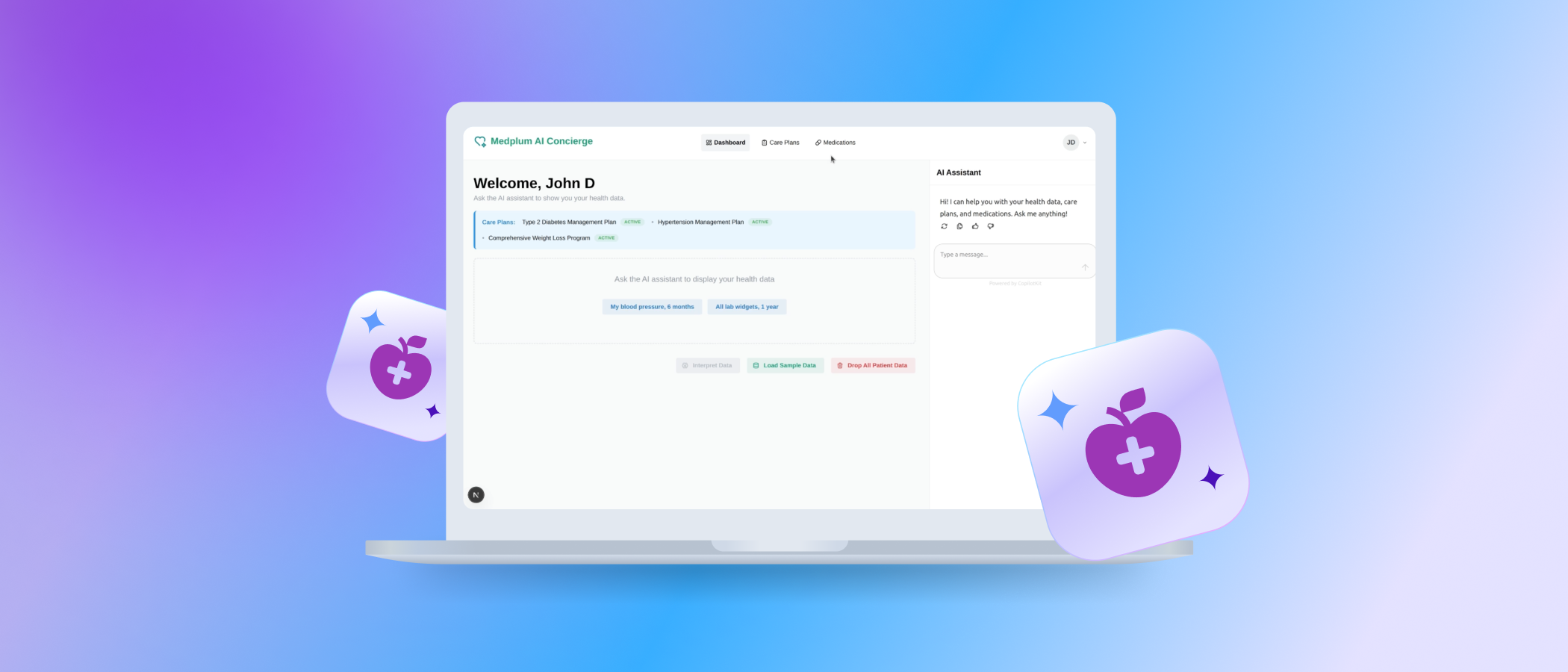
Medplum AI Concierge is Vinta's open-source demo of a Generative UI patient portal: instead of static screens, patients type a request ("show my glucose levels") and get back a live, interactive dashboard widget built from real FHIR data. It's built for patients, providers, and care teams, and healthtech product teams evaluating this pattern. The stack: AG-UI protocol + CopilotKit (frontend agent interaction), LangGraph (agent orchestration), and Medplum (FHIR system of record).
- Turns natural-language questions into structured FHIR queries — no menu navigation
- Renders 14 widget types: 6 vitals (blood pressure, heart rate, weight, BMI, waist circumference, temperature) and 7+ lab panels (glucose, HbA1c, cholesterol/LDL, HDL, triglycerides, eGFR, fasting insulin)
- Adds a one-click "Interpret Data" step that explains visible widgets in plain language
- Fully open source (Apache 2.0), built on Next.js, CopilotKit, LangGraph, and Medplum
When to use it: reach for this pattern when your patient-facing app needs to query, render, and explain real clinical data conversationally instead of through fixed dashboard screens. → Demo repo on GitHub · Tutorial video
Patient portals give users access to health data, but they do not always make that data easy to explore or understand. In most cases, patients still have to navigate static screens, interpret raw results, and figure out what matters on their own.
To make this experience more useful, healthcare applications need better ways to help patients explore and interpret their data. Aligned with these goals, Vinta built the Medplum AI Concierge, an open-source demonstration of an AI-powered healthcare dashboard that uses Generative UI (the practice of having an AI agent render actual interface components in response to a request, instead of only replying with text) to change how patients interact with their medical data.
Before we get into the architecture, here's a quick look at the Medplum AI Concierge in action.
The core technology: Generative UI, CopilotKit, and LangGraph
At the heart of the Medplum AI Concierge is the AG-UI Protocol (Agent–User Interaction Protocol): a standard for streaming an AI agent's actions, messages, and generated UI directly into a frontend. It's powered by CopilotKit, a framework that connects frontend React components to an AI agent as callable "actions," and orchestrated by LangGraph, a framework for defining an AI agent's reasoning steps as a graph.
This combination lets the application move beyond a simple conversational chatbot. Instead of just replying with text, the AI agent renders dynamic React components directly into the chat interface or dashboard. When a patient asks about their blood pressure, the agent fetches the structured FHIR data from Medplum and generates an interactive chart on the fly.
How it works: from prompt to interpretation
Here's the request lifecycle, using the glucose example from the demo:
- Prompt — The patient types a plain-language request: "Show my glucose levels over the past year."
- FHIR query — The agent interprets the request and queries the Medplum backend for the matching FHIR Observation resources — a FHIR resource type that represents a single measurement or lab result, like a glucose reading tied to a date and value.
- Widget render — CopilotKit renders a "Lab Results – Glucose" widget on the dashboard: a trend chart plus a status badge (Normal/High) built from the returned Observations.
- Interpretation — The patient clicks "Interpret Data." The agent reads all visible widget data and returns a contextualized, plain-language explanation in the chat sidebar — separate from the raw chart, so the two stay distinguishable.
The result: an empowered patient, fewer confused messages to the clinic, and a flow of information that spans vitals, lab results, medications, and Care Plans, the FHIR resource that captures a patient's ongoing treatment goals and activities.
Copy-paste examples
1. FHIR search for glucose Observations
A simplified example of the kind of search the agent issues against Medplum's FHIR API (glucose is commonly represented with LOINC code 2339-0, "Glucose [Mass/volume] in Blood" — confirm the exact code your implementation uses in apps/web/src/constants):
GET /fhir/R4/Observation?patient={patientId}&code=http://loinc.org|2339-0&_sort=-date&_count=50
GET /fhir/R4/Observation?patient={patientId}&code=http://loinc.org|2339-0&_sort=-date&_count=50This returns the patient's glucose Observations, most recent first, which the widget layer then turns into a trend chart.
2. Minimal "Lab Results – Glucose" React widget
type GlucoseReading = { date: string; value: number };

function LabResultsGlucoseWidget({
  readings,
  normalRangeMax = 99, // mg/dL, fasting
}: {
  readings: GlucoseReading[];
  normalRangeMax?: number;
}) {
  const latest = readings[readings.length - 1];
  const isHigh = latest.value > normalRangeMax;

  return (
    <div className="widget">
      <h3>Lab Results – Glucose</h3>
      <span className={isHigh ? "badge-high" : "badge-normal"}>
        {isHigh ? "High" : "Normal"}
      </span>
      <p>Latest: {latest.value} mg/dL on {latest.date}</p>
      {/* Trend chart component goes here, fed by `readings` */}
    </div>
  );
}
3. Sample AG-UI message instructing the agent to render the widget
{
  "role": "assistant",
  "action": "show_lab_results",
  "params": {
    "labType": "glucose",
    "timeRange": "1y"
  }
}
CopilotKit exposes show_lab_results as a frontend action; the LangGraph agent calls it once it has resolved the FHIR query, and CopilotKit renders the corresponding widget client-side.
Traditional patient portal vs. Generative UI concierge
In short: a traditional portal shows patients what a designer decided to expose, while a Generative UI concierge builds the view around what the patient actually asked. That shifts implementation effort from "design every screen" to "define new widgets and FHIR mappings," at the cost of needing a review layer to keep AI interpretations clearly separate from clinical data.
FAQ
What is Generative UI in healthcare? Generative UI is a pattern where an AI agent responds to a request by rendering an actual interface component — a chart, table, or widget — instead of only replying with text. In the Medplum AI Concierge, this means a question like "show my glucose" produces a live trend chart and status badge, not a paragraph describing the numbers.
How does it work with Medplum/FHIR? The agent translates a natural-language request into a FHIR search against Medplum (e.g., Observation resources filtered by LOINC code and patient), then hands the returned data to a React widget. Medplum acts as the FHIR-compliant system of record; the agent never stores clinical data outside it.
How is this different from a chatbot? A chatbot only returns text. This architecture, built on the AG-UI protocol and CopilotKit, lets the agent call frontend "actions" that render real components directly in the UI, and lets patients keep interacting with those components afterward.
Is it suitable for HIPAA-regulated workflows? The demo shows patterns (structured FHIR access control, a separate interpretation step) that map well onto regulated workflows, but it's a reference architecture, not a certified production system. Regulated deployments still need a signed BAA, audit logging, and PHI-handling controls layered on top; see Vinta's HIPAA compliance blueprint for that separate discussion.
How do I deploy the demo? Clone the repo, set up a Medplum project and patient access policy, configure environment variables (Medplum project ID, reCAPTCHA key, OpenAI key), then run pnpm install && pnpm dev. Full steps are in the quickstart below.
Implementation prerequisites
- Node.js 22.18+ or 24.12+, pnpm 9.15.0+
- A Medplum project (app.medplum.com/register) with your project ID on hand
- A patient default access policy, created from patient-access-policy.json in the repo, set as the project's default so patients can self-register
- A reCAPTCHA site key/secret (required for the patient registration form)
- An OpenAI API key (the demo defaults to gpt-5-mini, configurable via OPENAI_MODEL)
- Environment variables split across two apps:
NEXT_PUBLIC_MEDPLUM_BASE_URL,NEXT_PUBLIC_MEDPLUM_PROJECT_ID,NEXT_PUBLIC_MEDPLUM_RECAPTCHA_SITE_KEY,LANGGRAPH_DEPLOYMENT_URL,LANGSMITH_API_KEY(optional),OPENAI_API_KEY,OPENAI_MODEL
Checklist before you run it
- [ ] Medplum project created and project ID copied
- [ ] Patient access policy created and set as project default
- [ ] reCAPTCHA site created for
localhostand127.0.0.1 - [ ] OpenAI API key generated
- [ ]
.env.localcreated from.env.exampleand copied into bothapps/web/.env.localandapps/agent/.env - [ ] Logging reviewed so no patient identifiers or clinical values (names, DOB, lab values) hit console/log output in non-production environments — use record IDs instead
- [ ] A human-in-the-loop step defined for any interpretation that could inform a clinical decision
Quantified scope, limitations & safety
- Widget coverage: 14 widget types out of the box — 6 vitals (blood pressure, heart rate, weight, BMI, waist circumference, temperature) and 7 lab panels (glucose, HbA1c, cholesterol + LDL, HDL, triglycerides, eGFR, fasting insulin) — plus a generic FHIR search table widget for any other resource type.
- Model dependency: response latency, token limits, and cost all follow directly from the OpenAI model configured in
OPENAI_MODEL(the demo defaults togpt-5-mini); the project doesn't publish fixed latency or token benchmarks, since these shift with model choice, prompt size, and Medplum network conditions. If you need hard numbers for a production SLA, measure them against your own model and deployment. - Hallucination mitigation: the "Interpret Data" output is generated from the same structured FHIR data shown in the widgets, not from free-form recall, and it's kept as a separate, patient-triggered step rather than blended into the raw chart — so a wrong interpretation doesn't silently corrupt the underlying data.
- Human-in-the-loop: the demo is a reference architecture, not a clinical decision support tool. Any deployment that could influence care decisions should route interpretations through a clinician review step before acting on them.
- Audit logging: Medplum provides FHIR-level access logging; the demo itself doesn't add application-level audit logging for AI interactions, so production deployments handling PHI should add structured, PHI-free audit logs (opaque record IDs, not raw values) around agent actions.
Turning complex health data into actionable insights
Medplum AI Concierge is a practical example of how Generative UI can make patient-facing healthcare applications more useful. Instead of relying only on static dashboards and fixed navigation, it shows how AI can help patients ask better questions, surface the right data, and interact with that data in a more contextual way.
The patterns demonstrated in the project are relevant across a few different audiences:
For patients — it creates a more navigable experience around health data, making it easier to ask questions, follow trends, and understand what they are seeing.
For providers and care teams — it can reduce part of the back-and-forth that happens when patients are left alone to interpret raw results or static records.
For healthtech product teams — it offers a concrete reference for combining conversational AI, structured FHIR data, and dynamic UI in a patient-facing workflow.
For teams already building on Medplum or other FHIR-based systems, the demo can also serve as a technical reference for implementing similar patterns in production.
.webp)


