JEV-Like AI in Medplum: Checking Visit Notes Against Discharge Summaries

.webp)
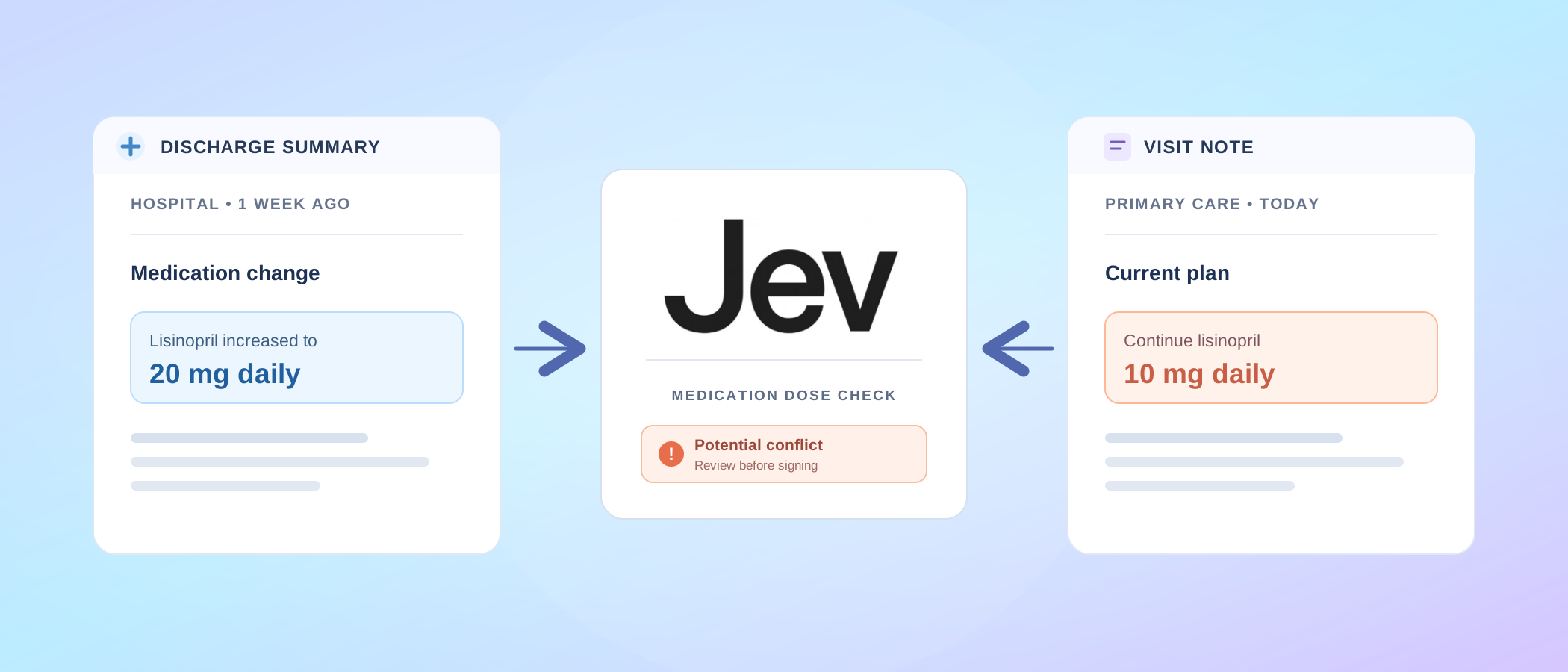
A patient comes back to primary care one week after a hospital stay for high blood pressure. The hospital raised their lisinopril from 10 mg to 20 mg once daily. The clinic's chart still says 10 mg, and so does the last visit note. The provider is running late and copies the plan from the chart: "continue lisinopril 10 mg daily". The visit's clinical note now conflicts with the discharge summary on the dose, and nobody has noticed.
Every record is right on its own terms. The conflict sits between two documents written by two organizations, and no step in the visit puts them side by side. Found after signing, it turns into staff hours: a call to the patient, a check on which dose the pharmacy filled, an addendum to a signed note. Found before signing, it is a one-line edit.
We built an open-source demo that detects that conflict before signing, inside the Medplum Provider App: vintasoftware/medplum-provider-jev. When the provider finishes the visit, a Medplum Bot asks Jev, TypeSafe's decision model, whether the note and the latest outside discharge summary agree on each active medication's dose. A review card shows the answer beside both passages. The provider can then correct the note, explain why the plan differs, or ask someone to reconcile the medication.
Following the discrepancy through a visit
In the demo, Start scenario creates a new synthetic patient with that history. A signed visit from 35 days ago lists lisinopril 10 mg, and the active order still has that dose. The discharge summary from a week ago raises it to 20 mg. Today's follow-up is ready to begin. The video below follows the provider through that visit in the real app, connected to a hosted Medplum project:
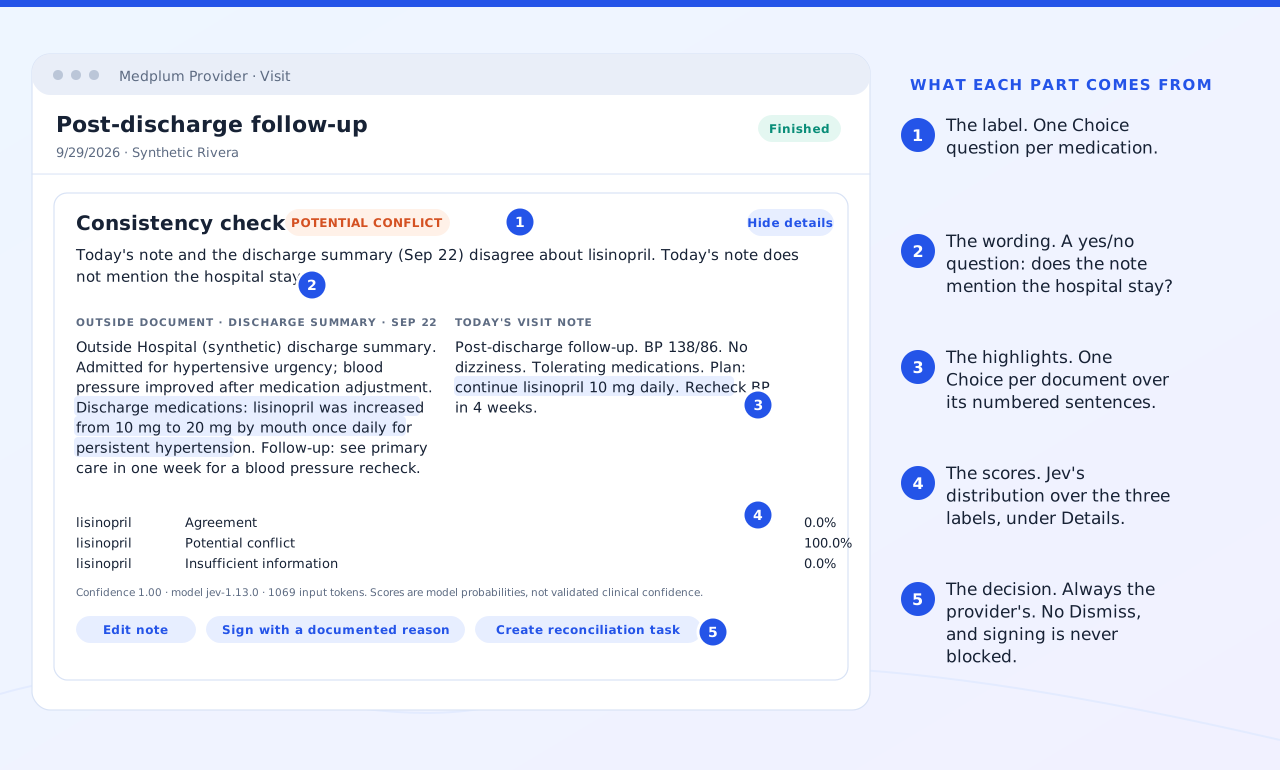
The provider reads the discharge summary, writes the visit note and sets the visit to Finished. That saves the note and runs the check once. If the plan says "continue lisinopril 10 mg daily", the card reports a potential conflict and highlights the dose in each document.
From there, the provider can edit the plan to acknowledge the hospital's increase to 20 mg, then press Check note to review the revised text. They can also sign with a documented reason or create a reconciliation task. Each choice is stored in the chart as FHIR records.
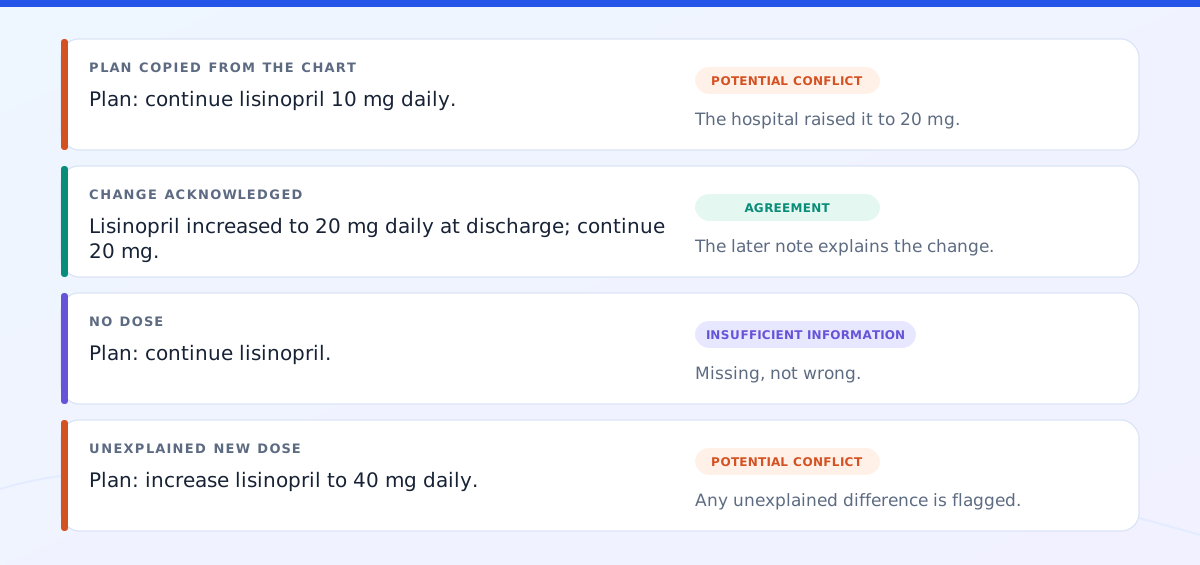
Below we have more examples of different Jev check results. A note that acknowledges the discharge dose produces agreement. "Continue lisinopril", with no dose, leaves too little information to compare. An unexplained increase to 40 mg produces another potential conflict: the model flags the difference for review because the note does not acknowledge the discharge change.
Why Jev? Turning the comparison into a typed answer
If both documents stored the dose in a separate field, the app could compare the values directly. Here, the dose is part of a sentence. The check has to distinguish an old prescription from a new plan and recognize when the provider has acknowledged a change.
Jev, TypeSafe's proprietary System One decision model, is able to read those sentences. We send it the documents as named JSON state, along with a question and the allowed answers. For a Choice question, Jev picks one of those answers and returns a probability for each option. Deterministic Medplum code can use the selected answer directly, without having to interpret a written explanation.
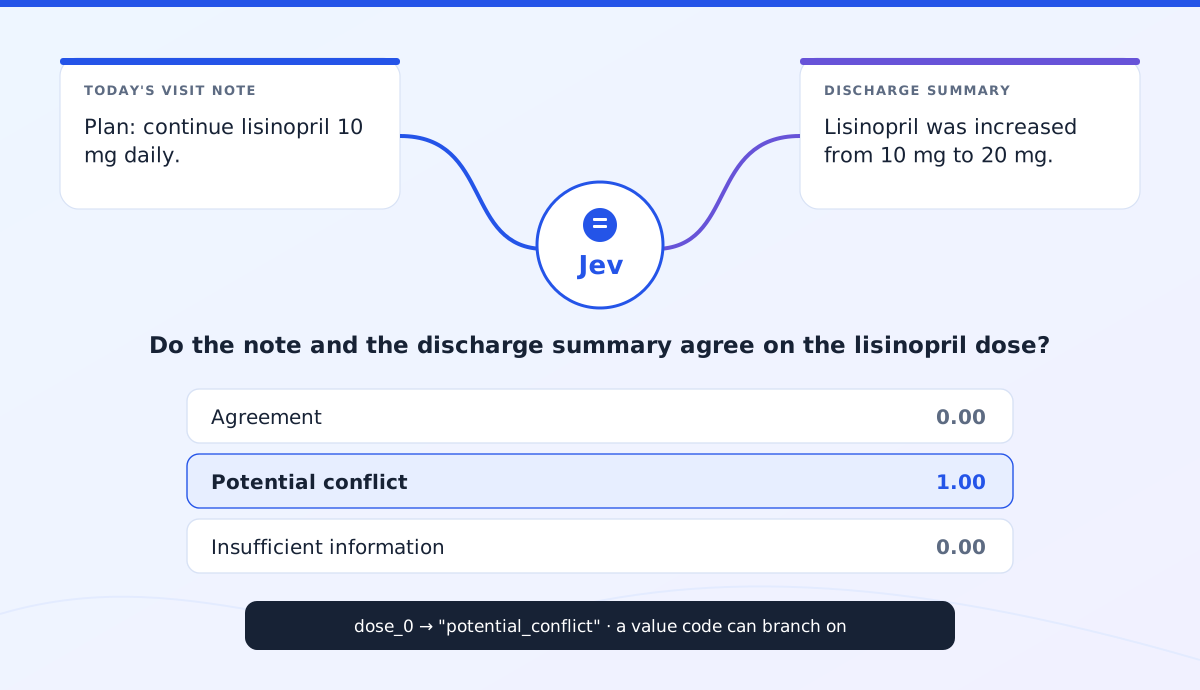
Why not a general LLM? The probabilities Jev returns are trained to be calibrated, so code can set thresholds and the review card can display them to humans. Jev latency is in the hundreds of milliseconds, and at the listed $42 per billion input tokens the roughly 950 tokens a check sends cost a few thousandths of a cent, about 25,000 checks per dollar. An LLM would need a label-and-explanation prompt, forced structured output and a parser with a retry path. Also, LLMs' latency, costs, and answer stability are worse for this application.
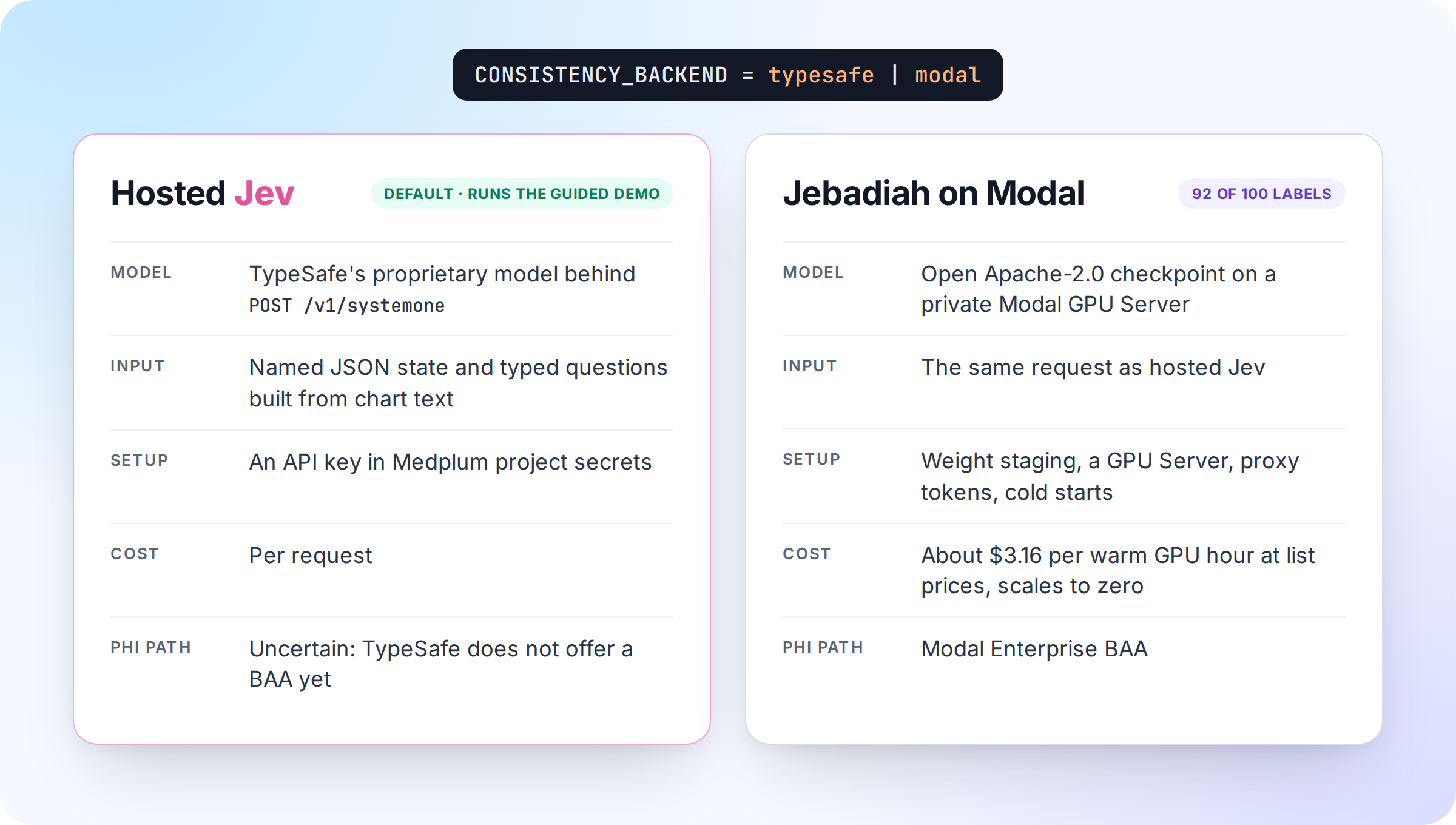
For this check, the choices are agreement, potential_conflict and insufficient_information. We also tell the model what each answer means. Different doses count as a potential conflict when the later note does not acknowledge a change. A note that explicitly acknowledges the change can count as agreement. These definitions travel with the question in every request. Request to Jev is made via a deterministic Medplum Bot. Alternatively, open-weight models like Jebadiah could be used instead of Jev on Modal.com if you host them there:
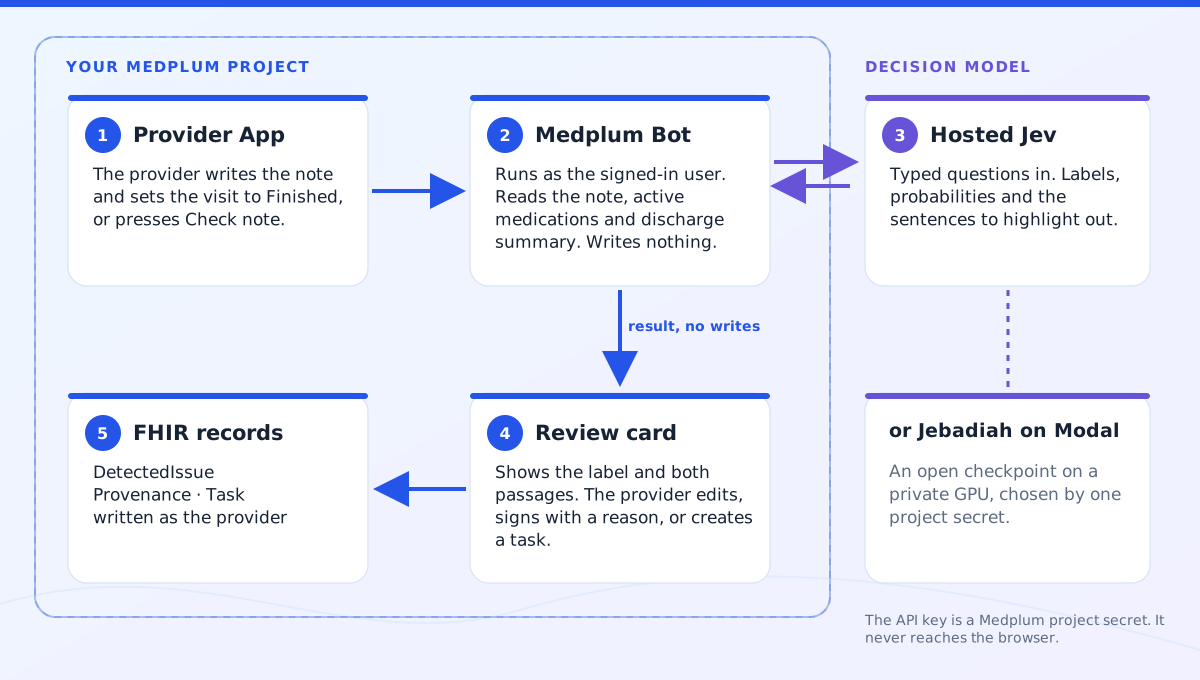
That request asks the decision model, Jev or Jebadiah, three kinds of questions. One Choice per medication supplies the dose label. A Yes/No question asks whether the note mentions the hospital stay, which affects the card's wording. Further Choice questions select from numbered sentences in each document, giving the card its highlights. The card also exposes the label probabilities so the provider can inspect the model's answer alongside the source text:
Here is an abbreviated request. The Bot, app and measurement script all read the same question wording from provider/src/data/model-contract.json:
{
  "model": "jev-latest",
  "state": {
    "active_medications": ["lisinopril"],
    "outside_document": { "title": "Discharge summary", "date": "...", "author": "...", "text": "..." },
    "visit_note": { "title": "Today's visit note", "date": "...", "author": "...", "text": "..." }
  },
  "questions": {
    "dose_0": {
      "type": "choice",
      "instructions": "Do `outside_document.text` and `visit_note.text` agree about the current dose and frequency of lisinopril? `visit_note` was written after `outside_document`.",
      "criteria": {
        "agreement": "Both documents state a compatible dose and frequency for lisinopril, or the later document explicitly acknowledges the change described in the earlier one.",
        "potential_conflict": "The documents state different doses or frequencies for lisinopril as the current plan, and the later document does not acknowledge a change.",
        "insufficient_information": "At least one document does not state a dose or frequency for lisinopril, or does not mention it."
      }
    },
    "mentions_hospital_stay": { "type": "noul", "instructions": "..." },
    "sentence_visit_note_0": { "type": "choice", "instructions": "...", "criteria": { "s1": "...", "s2": "...", "none": "..." } }
  }
}
The Bot's TypeSafe key stays in a Medplum project secret. Learn more on how to use Jev by reading TypeSafe's documentation.
Keeping the check with the provider's decision
Once the Bot returns a valid result, the app saves it as a DetectedIssue under the provider's access. It stores the labels, probabilities and sentence positions without copying chart text. Reloading the card reads that record rather than asking the model again. If the provider edits the note, the old check becomes stale until they press Check note and save a new result. After signing, both the signature and the check remain visible on the visit.
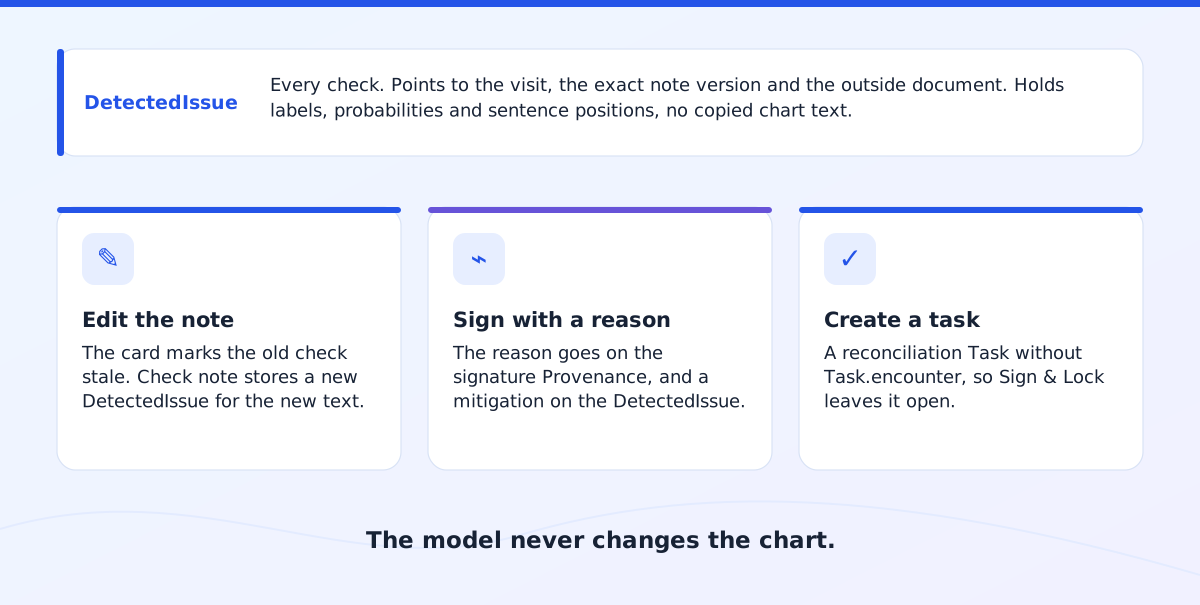
The provider's response is recorded with the result. Signing with a reason puts that reason on the signature's Provenance and adds a mitigation to the DetectedIssue. Creating a reconciliation task also records a mitigation, but deliberately leaves Task.encounter unset. Otherwise Sign & Lock would complete the task along with the visit, closing the request before anyone had reconciled the medication.
How good is Jev? What the tests tell us
As of October 1, 2026, model jev-1.13.0 matched our expected label on 98 of 100 test inputs and selected the expected sentence for 199 of 200 highlights (97 to 98 labels across three more rounds). The inputs are the guided demo's four scenario notes, five hand-written dose cases and 91 generated cases across 41 medications: dose increases and decreases, equivalent wordings, explicit acknowledgments, and missing or unmentioned doses. provider/scripts/gen-cases/ holds the specs and the generated prose:
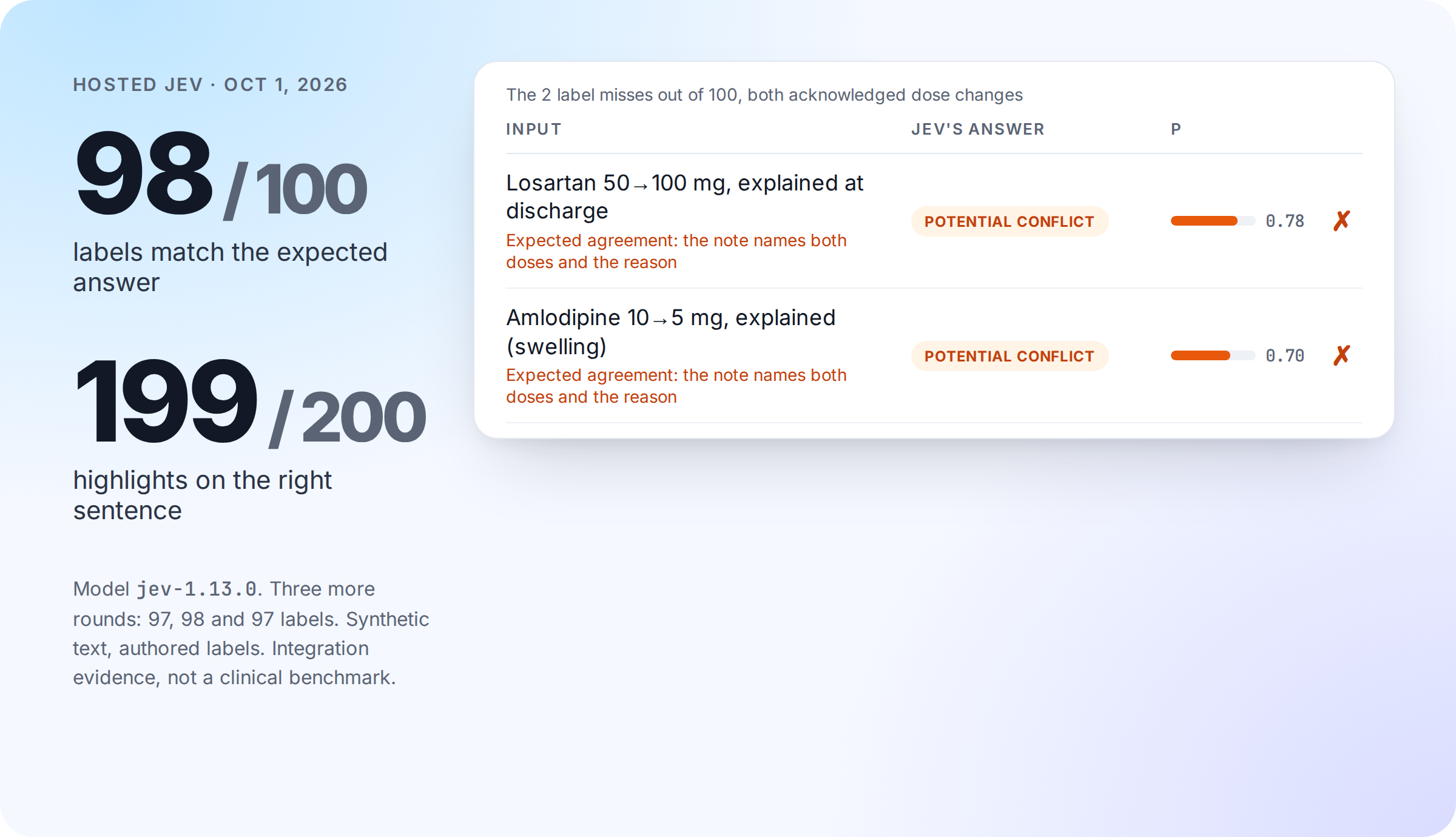
Both label misses are notes that name the old dose, the new dose and the reason for the change, which the Bot's criteria call agreement; Jev scored them potential_conflict at 0.78 and 0.70. Most acknowledged changes scored correctly, so the sensitivity is to the specific phrasing. The one highlight miss picked a neighboring sentence in a note that says "once a day" where the discharge summary says "daily".
That result makes acknowledgment phrasing part of the work still to evaluate. These are synthetic inputs generated from structured specs, not clinician-reviewed cases; they show how the model responds to our questions, not clinical accuracy. A clinical evaluation needs clinician-reviewed labels and must treat false agreements, which miss a dose error, differently from false conflicts, which cost the provider a review. Therefore, the displayed scores are a distribution over the available answers, not a measure of clinical correctness.
The highlights showed how much a small wording change can matter. Our first question asked for the sentence stating the current dose. For "increase lisinopril to 40 mg daily", Jev consistently chose none, with probabilities from 0.83 to 0.89 over five identical calls. The wording appears to have excluded a proposed change from what counted as current. We tried four versions on nine inputs:
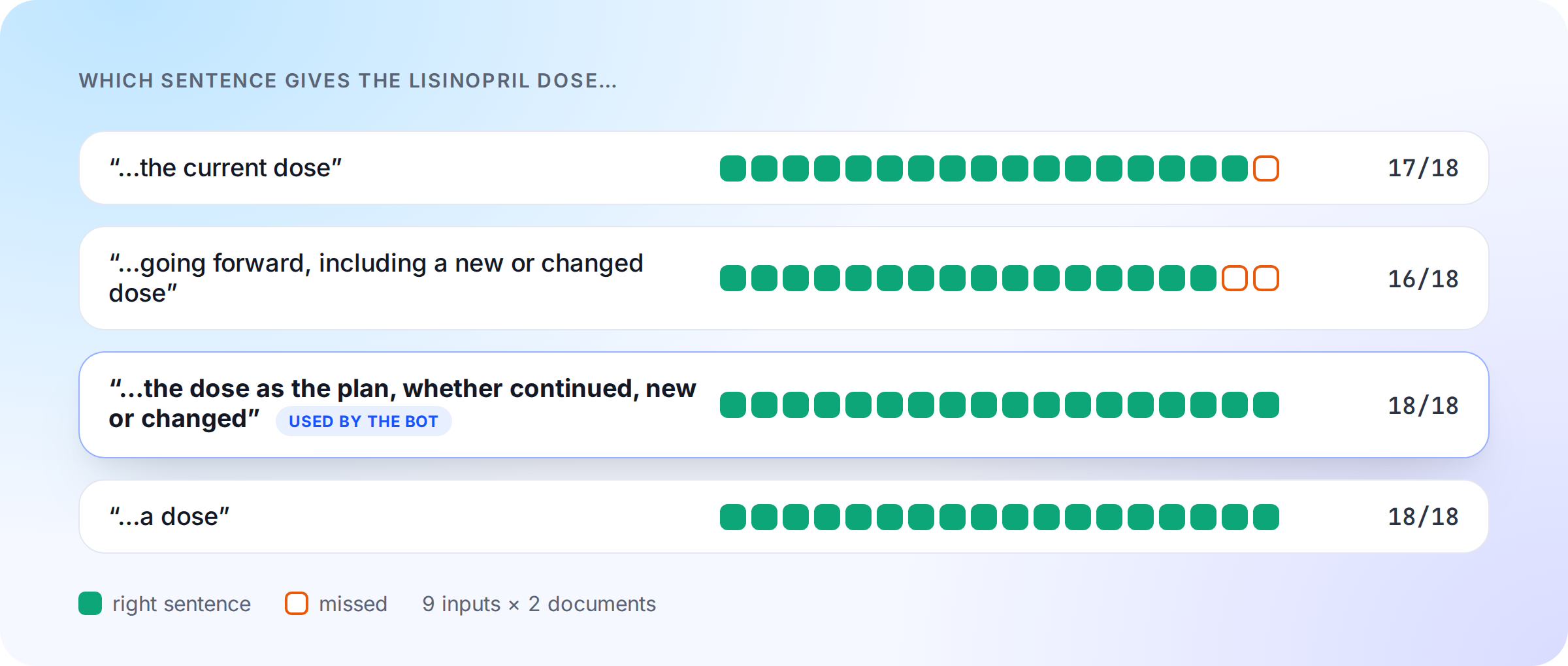
The Bot now asks for the dose "as the plan, whether continued, new or changed". That wording selected all 18 expected sentences and is intended to favor the plan over a sentence mentioning an old dose.
Evaluating an open model
To explore running an open-weights model in our own Modal account, we deployed top-performing Jev-like open models on a private Modal GPU behind the same /v1/systemone request, so we can keep the same Medplum demo code. We took candidates with downloadable weights from the September 28 Decision Index and ran the Bot's own requests for the 100-case benchmark above:
The Bot applies one rule on top of the model's label. When a model labels a medication agreement but its own highlight answer finds no sentence stating a dose in one of the documents, the Bot reports insufficient_information instead, since a missing dose cannot be an agreement; it never changes a potential_conflict. The counts above include that rule. It fired on 11 of the 100 cases for Jebadiah 27B and once for hosted Jev.
The top performing one was Jebadiah 27B, and its calibration error is the lowest among the top entries, which matters because the card shows the probabilities. All eight of its misses are acknowledged dose changes it called potential_conflict at 0.51 to 0.63. The benchmark has 19 such cases; hosted Jev missed 2 of them and AutoJev-27B 16, despite ranking higher on the index and on clinical-trial statements (NLI4CT). The index's top entry, Surogate Rune, answers through its own serving engine and decision API rather than the /v1/systemone request the Bot sends, and has a calibration error of 0.12, therefore it wasn't tested.
Jebadiah fine-tunes Qwen3.8-27B and reads each question's option logits in one forward pass, with a temperature fitted per question type. Its 56 GB of BF16 weights fit one A100 80 GB, about $3.16 per warm hour at list prices, scaling to zero between uses. Warm checks take 0.5–0.7 s; a cold start, including a kernel warm-up, usually takes three to four minutes, and once took 18 when the weights loaded slowly. It runs behind its authors' own server, pinned to a reviewed commit. More details at Model card, server code, and our SELF-HOSTING.md documentation.
On 100 synthetic cases the gap between the open models and hosted Jev is clear, but the benchmark index does not predict it. ContractNLI measures legal document entailment; NLI4CT measures clinical-trial statements. Neither measures medication reconciliation, and the entries use different hardware. Our cases point to acknowledged dose changes as the open models' weak spot: they flag an explained change as a conflict, which costs the provider a review but does not hide an error. That is another reason to keep both passages visible to the provider. The index data and methodology provide more context for those open models.
DoccyHealth's Solomon deserves a closer comparison because it was built for document-grounded healthcare questions. It uses trained answer heads and an adapter, with reusable document states and optional evidence pointers. Adopting it would require its own runtime and state-cache hosting. Its published validation covers 802 questions over 54 real documents, with AI-generated labels that were not human-verified, so it too needs a task-specific evaluation with clinicians.
A separate group of projects explores decision-oriented inference with existing weights, without training a new checkpoint. Simple Jev takes this approach.
What would have to change for real patient data?
The current project contains only synthetic records. Moving to patient documents would require a separate access-controlled project, BAA coverage for every service that sees the text, and tested retention, deletion and incident handling. We have no evidence TypeSafe signs BAAs for healthcare companies using Jev.
Those requirements influenced the self-hosted deployment. Modal documents Enterprise BAAs and HIPAA support, with Volumes v2 covered but Volumes v1, user code, memory snapshots and most images excluded. Modal Servers proxy payloads without storing them, whereas Functions can keep inputs and outputs for up to seven days. Our demo endpoint therefore uses a Server with snapshots off and weights on a v2 Volume to simulate a HIPAA-compatible configuration. Learn more about Modal security.
Taking the demo further
The immediate next step for Jebadiah is a larger evaluation on the same workflow as hosted Jev, with clinician-reviewed labels. The first runs already show where to look: missing doses and dated changes. SELF-HOSTING.md shows how to switch the demo to it.
The workflow could also support a different check: whether a signed note and its addenda support the diagnoses submitted on a claim. Before Submit Claim in Details & Billing, a Bot could ask one Choice per diagnosis the provider added: supported, not_supported or insufficient_documentation. The provider would resolve each result with an addendum or by removing the diagnosis; the model would never propose or change a code.
As with the dose check, the provider would see the relevant passages before completing the work, and their decision would stay in the chart with the check.
To try the working dose check, start with the README. It takes a Medplum project with Bots enabled, a TypeSafe API key and four steps.




.webp)
.webp)



%201.webp)


