Scheduling integrations in healthcare: a practical guide for digital health teams

.webp)
Scheduling looks deceptively simple. In reality, it is one of the most fragile and high-stakes workflows across healthcare. Behind every 15-minute slot sits a maze of clinical rules, staff availability, insurance constraints, and operational edge cases.
Because of this complexity, digital health teams rarely find a single tool that fits their model out of the box. They need to evaluate vendors, APIs, EHR-native options, and automation layers in a much more holistic way, especially as workflows evolve.
This guide maps that landscape and explains the technical considerations that matter when building reliable scheduling flows in healthcare. It highlights patterns that appear in primary care, specialty care, hybrid care, and virtual-first models.
Whether your team is building a new patient experience, modernizing an existing workflow, or designing a hybrid care model, this overview helps you choose the right technical foundation.
Why scheduling is harder than it looks
Healthcare scheduling is not just a calendar problem. It is a problem of matching clinical intent, operational constraints, and unpredictable human behavior.
Specialty care adds even more complexity:
Visit reason + workflow logic
Different visit types require different resources, durations, and sequencing. A 15-minute follow-up is nothing like a diagnostic procedure, and some visits must be booked in strict order (e.g., ultrasound → follow-up).
Provider preferences and constraints
Doctors have strong preferences about when and how they see patients. Some allow new patients only on certain days. Others reserve time for procedures, have split clinic schedules, or need buffers around certain slots.
Many providers are also not dedicated to a single location. It is common for clinicians to split time across multiple clinics or hospitals, with schedules that change week to week. This breaks assumptions around fixed working hours and recurring availability, making provider scheduling far more dynamic and harder to model.
Room, equipment, and staffing dependencies
Procedures require specific rooms, machines, and support staff. If the room or staff are unavailable, the visit cannot be booked, even if the physician is free.
Insurance requirements
Eligibility, referrals, and prior authorization often must be checked before the appointment is confirmed. If these are missing, the visit may get denied.
No-show risk and backfilling
Practices need workflows to:
- detect no-shows
- proactively backfill openings
- trigger reminders or self-serve rescheduling
- handle variable visit lengths when patients ask for “just one more issue”.
Hybrid care complexity
Most specialty care providers run virtual + in-clinic models. This introduces new logic around modality, appropriate visit types, location routing, and virtual-provider availability.
All of this makes scheduling deeply tied to the practice’s operating model. It creates significant variation between clinics, specialties, and even individual providers. Any integration must be flexible enough to reflect these realities without creating brittle logic that breaks on every edge case.
What digital health teams want to enable
For specialty care, a simple booking tool is not enough. Teams need scheduling that reflects clinical logic, supports hybrid care, and reduces manual work.
This pushes product and engineering teams toward systems that offer:
A unified patient experience
Patients should see clear availability, self-book easily, and receive coordinated reminders.
Dynamic provider availability
Availability synced across external calendars (such as Google Calendar or Outlook), EHR schedules, time-off blocks, and patient load. In practice, this often means reconciling multiple sources of truth in real time.
Workflow-aware scheduling
Visit type logic, referral checks, document requirements, and multi-visit sequences should all be automated under the hood.
Hybrid care flows
Support for telehealth, in-clinic, and hybrid follow-ups without requiring manual staff intervention.
No-show mitigation
Automatic text reminders, rescheduling links, and waitlist backfilling.
Operational efficiency
Front-desk and care-coordination teams need visibility across all flows, not more manual work.
These expectations explain why teams increasingly look beyond simple booking widgets and toward robust infrastructure they can tune to their clinical model.
Technical approaches to scheduling integrations
There is no single “best” approach. Each model solves for different levels of flexibility, effort, and integration depth.
A. Embeddable scheduling components
Examples: Acuity, Calendly, Cal.com embeddable UI
Best for: Fast implementations, patient-facing flows, minimal engineering lift
Embeddable components allow teams to drop pre-built booking UIs into their app. They support basic customization, reminders, and provider availability.
Pros
- Very fast to implement
- HIPAA plans available (Acuity)
- Good for simple scheduling needs
- Easier to maintain than custom builds
Cons
- Limited control over complex workflows
- Harder to sync deeply with EHR logic
- Custom sequencing or insurance logic is often impossible
- When teams rely on Acuity’s API rather than its native UI, limitations become apparent. The user experience is often confusing, and some API configurations fail silently, making it difficult to fully control scheduling behavior and notifications.
- UI customization is limited, making it difficult to align with product design systems
When it fits
Teams that want a clean patient-facing experience without building everything from scratch.
B. API-first scheduling infrastructure
Examples: Tellescope, Cal.com API, Nylas Calendar API, Healthie Scheduling API
Best for: Custom logic, multi-provider routing, deeper control
API-first providers expose scheduling logic without forcing you to use their UI.
Pros
- Highly customizable
- Can express complex specialty logic
- Easier to integrate with EHRs and internal APIs
- Better for multi-site or multi-specialty flows
Cons
- Requires engineering resources
- Must build and maintain your own UI
- Need to define all edge-case logic
When it fits
Teams with engineering bandwidth and differentiated scheduling needs.
C. EHR-Native Scheduling APIs
Examples: Medplum, Canvas Medical, Elation, DrChrono
Best for: Practices where the EHR must remain the source of truth
When scheduling must sync tightly with clinical workflows, EHR-native APIs are often the safest route.
Pros
- No risk of double-booking across systems
- FHIR-native options (Medplum) simplify interoperability
- Often come with built-in business logic for clinical workflows
Cons
- Requires engineering resources
- Must build and maintain your own UI
- Testing sandbox availability varies
When it fits
Teams that prioritize clinical accuracy over UX control.
D. AI-powered administrative agents
Examples: Assort Health (voice/text agents), Notable (enterprise automation)
Best for: High-volume clinics, phone-heavy workflows, aging back-office systems
AI agents can automate intake questions, triage, and appointment creation. They can also handle outbound insurance verification or rescheduling.
Pros
- Huge reduction in call volume
- Faster triage and intake
- Automates referral and prior authorization logic
- Adapts to specialty rules over time
Cons
- Workflow brittleness across sites
- Requires tuning per practice
- Regulatory and operational oversight needed
- Often limited sandbox access
When it fits
Scenarios where teams want to reduce manual admin without rewriting the scheduling engine. It can be combined with the other approaches.
E. Open-source or build-your-own scheduling
Examples: Cal.com OSS, Medplum + custom UI, custom wrapper libraries
Best for: Teams with unique workflows or long-term platform ownership needs
This approach provides the most flexibility and the highest engineering cost.
Pros
- Full control and extensibility
- Can match any specialty workflow
- No vendor lock-in
Cons
- Requires significant engineering effort
- Must maintain long-term
- Requires healthcare workflow expertise to avoid brittleness
When it fits
Platforms with unusual or proprietary scheduling models (e.g. multi-step perioperative workflows).
.webp)
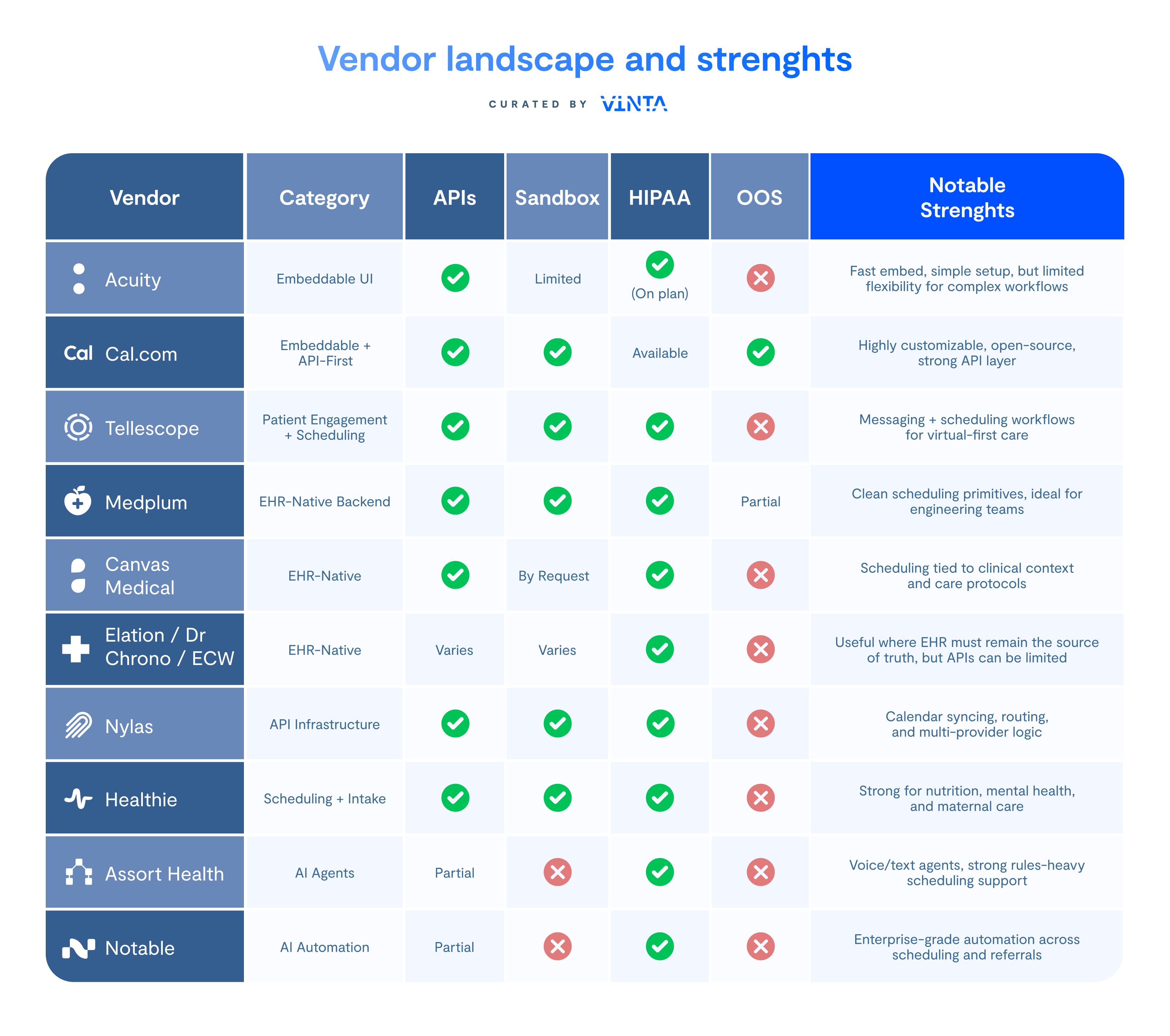
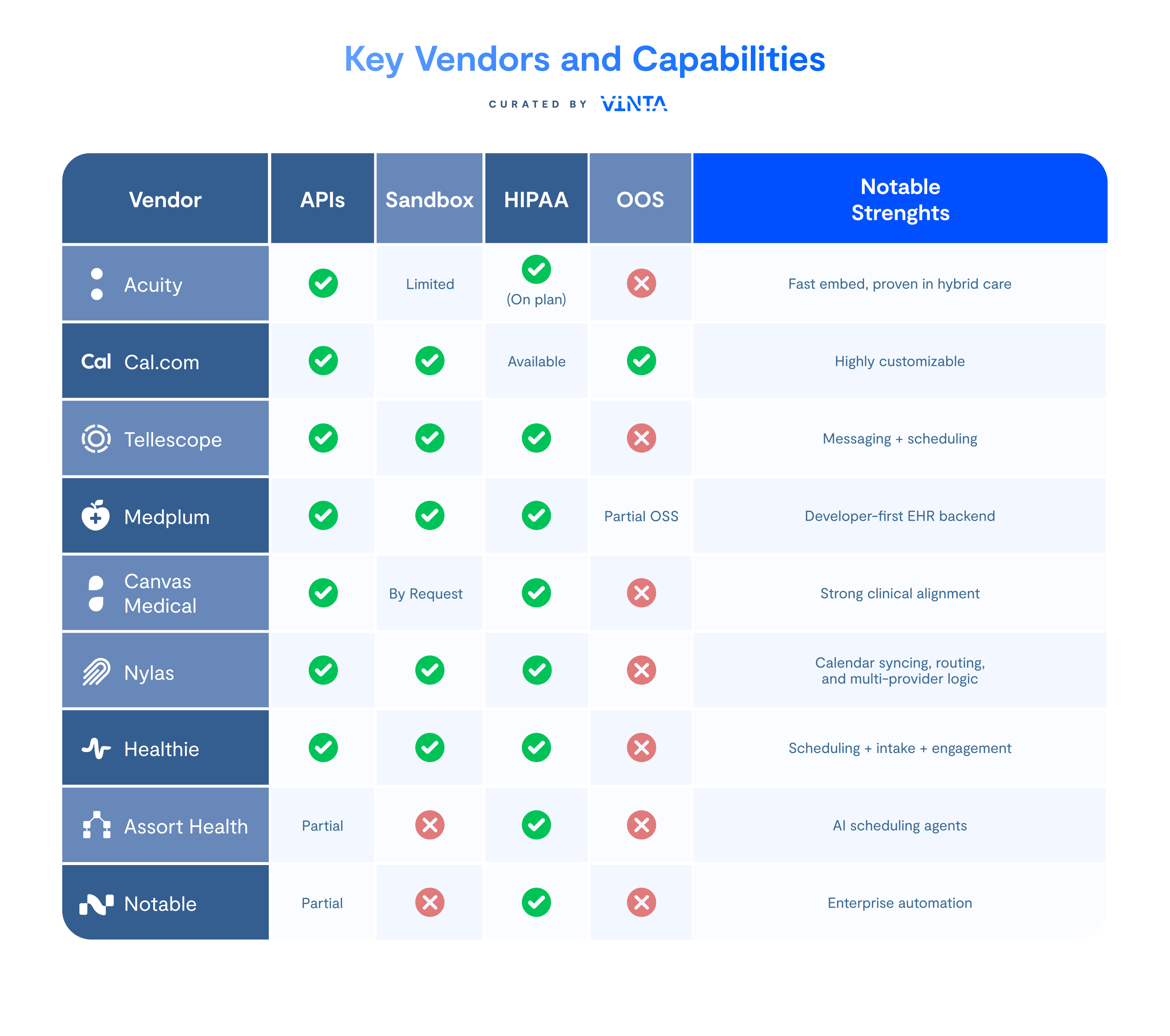
Vendor landscape and strengths
The table below summarizes the most widely used scheduling and scheduling-adjacent tools in healthcare. These tools differ in API depth, customizability, and how well they support complex workflows.
Decision framework: how to choose the right integration
Use this checklist to determine the right model:
1. How complex are your workflows?
- Simple → embed a widget
- Moderate → API-first
- Complex sequencing → EHR-native or custom
2. Does your specialty require multi-step visits?
If yes, avoid simple widget-based tools.
3. How tightly must scheduling sync with your EHR?
If EHR is the source of truth → choose EHR-native APIs.
4. Is no-show mitigation critical?
Tools with waitlist backfilling or outbound automation bring value here.
5. Do you need to minimize engineering lift?
Embeddable tools or AI agents help accelerate delivery.
6. Are you building for hybrid care?
Select tools with both telehealth and in-clinic flexibility.
When it makes sense to build custom scheduling
Building custom scheduling is justified when:
- You have highly specialized multi-step workflows
- Provider preferences are complex and frequently changing
- You need complete control over the patient experience
- You are integrating multiple EHRs or multiple provider groups
- Vendor-based logic cannot represent your specialty rules
Comparison Tables
Table 1: Integration Models at a Glance
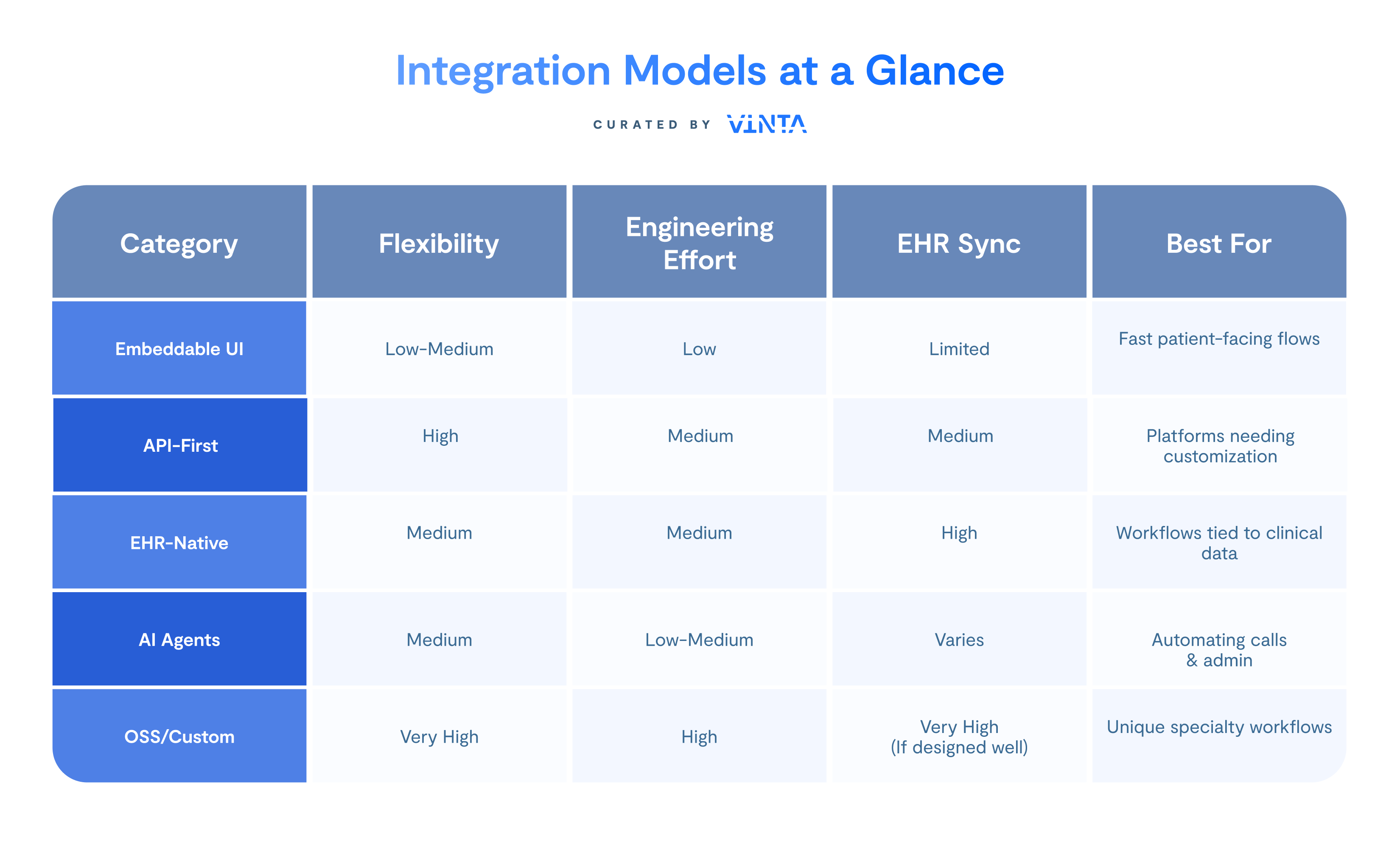
Table 2: Key Vendors and Capabilities
The right path for your scheduling strategy
Scheduling is a reflection of how a specialty care practice operates: the deeper the workflow complexity, the more your integration strategy matters.
Most digital health teams use a mix of different approaches over time. What matters is choosing the right foundation for your current stage while planning for the next one. The ecosystem is evolving quickly, and new patterns are emerging around interoperability, FHIR-native scheduling, hybrid care, and multi-visit logic.
If your team is navigating these decisions or validating vendors, we can help you map the landscape, evaluate tradeoffs, and design a scheduling foundation that aligns with your product goals.